Insta360 Luna Ultra vs iPhone 17 Pro: Which Camera Is Better?
Oct 13, 2026Get the full story watching the video above ⬆️
The question I get more than almost any other is whether a dedicated pocket camera still makes sense when smartphones have gotten this good.
And I think the Insta360 Luna Ultra vs iPhone 17 Pro comparison is a perfect example of that.
The iPhone 17 Pro is already in your pocket. It has multiple cameras, stabilization, great computational processing, and with an app like Blackmagic Camera, you can get much more control over things like exposure and frame rate.
But the Insta360 Luna Ultra was designed from the beginning to be a dedicated video camera.
So the real question isn't just which one technically has better image quality.
It's whether the Insta360 Luna Ultra gives you enough of an advantage over the iPhone 17 Pro to justify carrying a separate camera.
I've spent time shooting both of them side by side in daylight, blue hour, low light, difficult dynamic range situations, vlog shots, zoom tests, foliage, interiors, and real-world environments.
And some of the results genuinely surprised me.
Insta360 Luna Ultra vs iPhone 17 Pro Specs
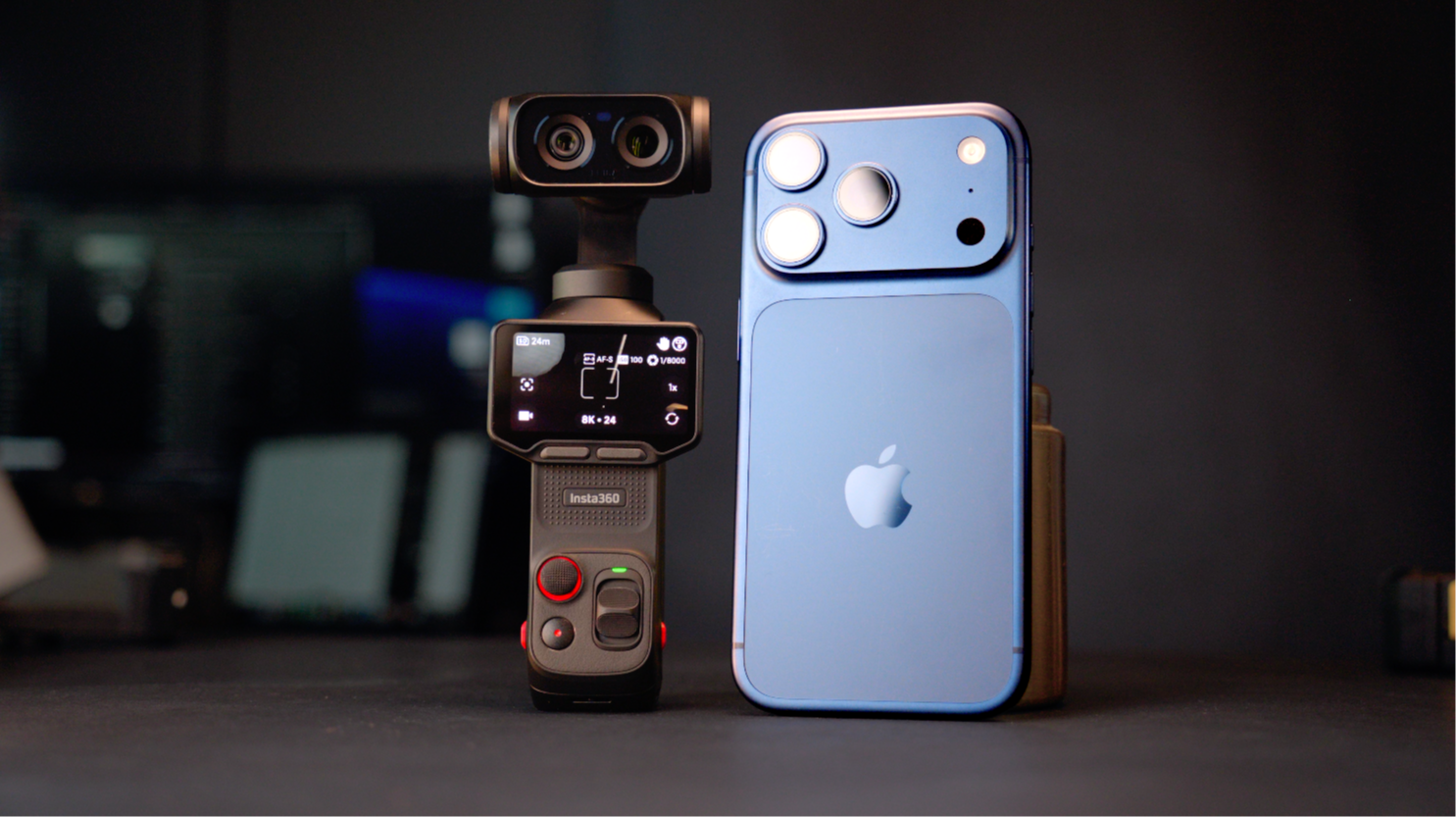
The Insta360 Luna Ultra is much more video-focused.
It uses a 1-inch main sensor with roughly a 20mm equivalent lens, along with a tighter 60mm equivalent 3X camera.
The iPhone 17 Pro gives you a more versatile overall camera system with three rear cameras:
- 13mm ultra-wide
- 24mm main camera
- 100mm 4X telephoto
That makes the iPhone more flexible if you want a huge range of focal lengths from one device.
The Luna Ultra, however, is much more focused on video creation.
You also get manual exposure controls directly inside the camera.
On the iPhone, I personally recommend using the Blackmagic Camera app if you want more control over things like shutter speed, ISO, white balance, frame rate, and exposure.
My Insta360 Luna Ultra Film 101 + Film 202 Course
If you end up getting the Luna Ultra and want to learn how to actually use it instead of just leaving everything in Auto, I created a complete Insta360 Luna Ultra Film 101 and Film 202 course bundle.
Film 101 walks you through setting up the camera from scratch and understanding the settings that actually matter.
I cover things like exposure, frame rates, white balance, color profiles, i-Log, stabilization, audio, and how I personally configure the Luna Ultra before filming.
Then in Film 202, we take things outside of the menus and focus on actually creating better-looking footage.
I get into cinematic movement, composition, low-light shooting, using the 1X and 3X cameras, slow motion, camera movement, and the techniques I personally use when filming with the Luna Ultra.
I also created Film Look LUTs for the Insta360 Luna Ultra and iPhone if you want to give your footage a more finished or film-inspired look.
You can find all of that over at The Film Alliance.
Now let's get into the actual comparison.
Insta360 Luna Ultra vs iPhone 17 Pro Image Quality
The first thing I noticed when comparing these cameras is that they often have very different ideas about how an image should look.
The Luna Ultra generally gives me more contrast, deeper shadows, and an image that feels a little more like what I expect from a dedicated camera.
The iPhone 17 Pro tends to lift the midtones and shadows more aggressively.
That can sometimes make the image easier to see, but it can also make the footage feel more processed to me.
There are plenty of situations where these cameras look incredibly close.
But once I start shooting in more difficult lighting, especially at night, the differences become much easier to see.
Insta360 Luna Ultra vs iPhone 17 Pro Low Light
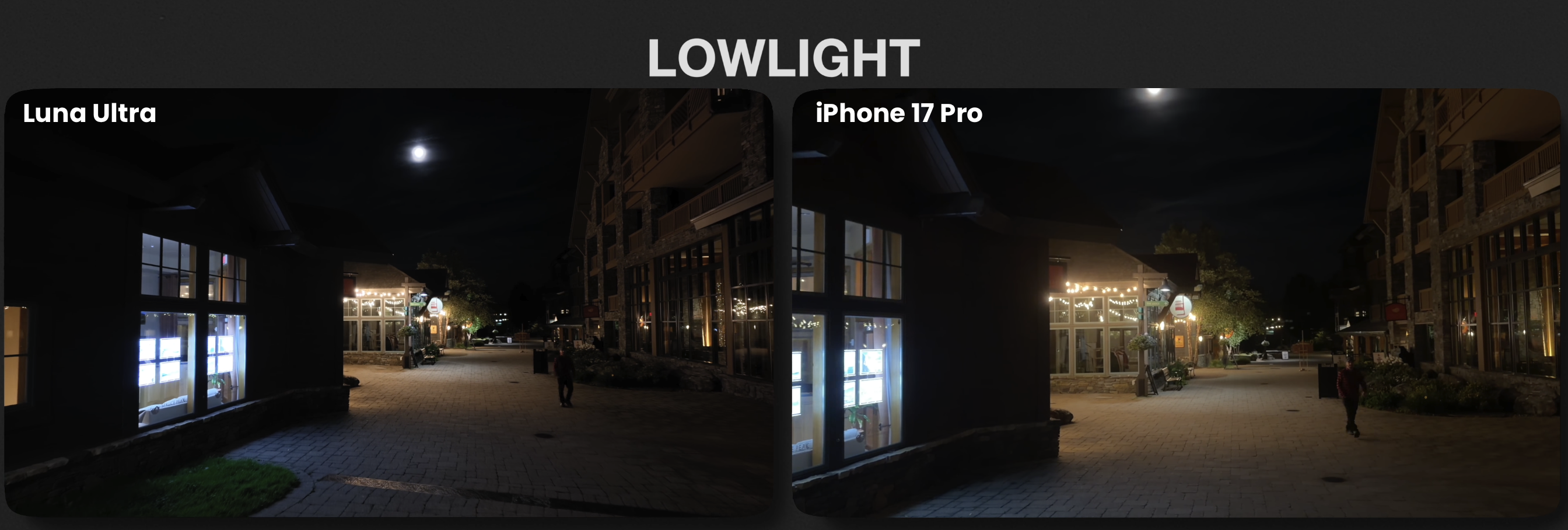
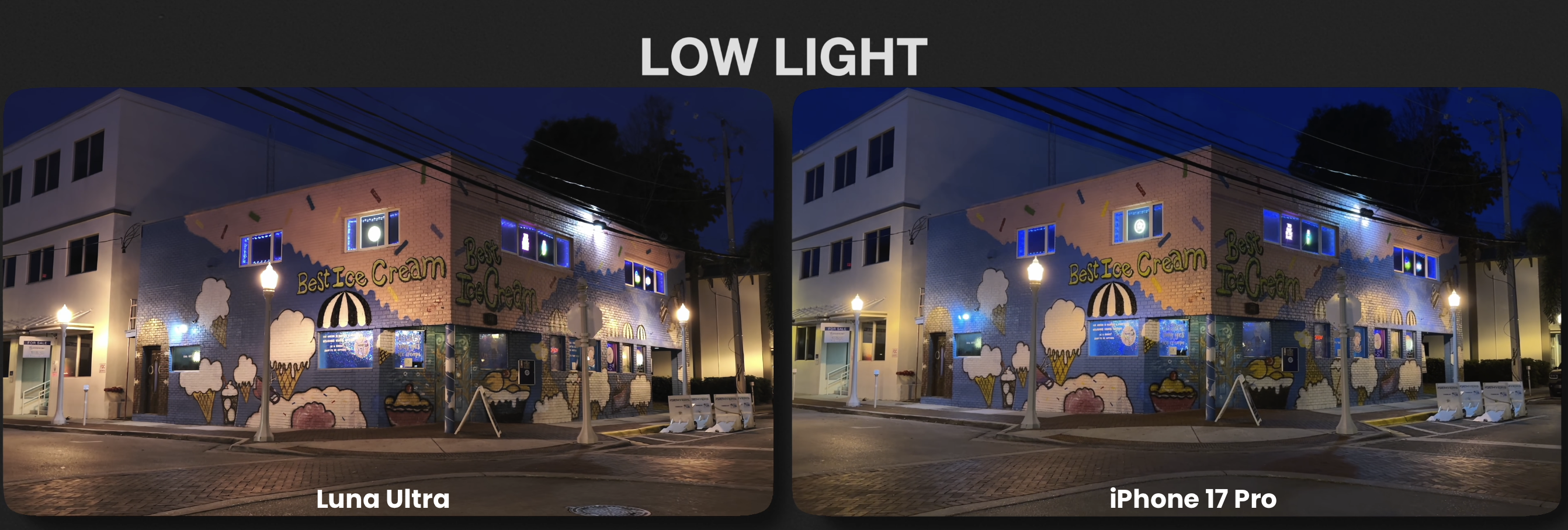
Low light is one of the areas where the Insta360 Luna Ultra really started separating itself from the iPhone 17 Proin my testing.
In one of my nighttime shots, there was very little available light other than some light bouncing around the environment.
The Luna Ultra looked much more realistic to me.
The darker areas stayed dark, the highlights felt controlled, and the overall image reminded me more of something I might see in a movie.
The iPhone 17 Pro lifted a lot more of the midtones out of the darkness.
That isn't necessarily bad.
Some people may actually prefer having more visible information in the shadows.
But to me, that extra lift is one of the things that makes the iPhone footage register more like smartphone video.
The Luna's larger sensor also appears to be helping it preserve a more natural-looking image in those darker environments.
Skin Tones
I also compared both cameras while vlogging and walking between direct sunlight and shade.
For this particular test, I preferred the Luna Ultra skin tones.
It kept some of the redness in my face under control and looked closer to how I actually looked in person.
The iPhone 17 Pro pushed my skin warmer and more intense.
When I first walked into direct sunlight, the iPhone also pushed the exposure harder for a moment before settling back down.
The Luna Ultra looked more consistent to me during that transition.
Stabilization: Luna Ultra vs iPhone
This one surprised me because the two cameras use completely different stabilization systems.
The Insta360 Luna Ultra uses a mechanical gimbal, while the iPhone 17 Pro relies heavily on electronic stabilization.
But in good lighting, they can look surprisingly similar.
Both cameras produce a very smooth, stabilized image while walking.
If I wasn't specifically looking for the difference, I don't think stabilization alone would be enough for me to choose one of these cameras over the other.
The Luna Ultra obviously gives you that traditional gimbal movement, but Apple has gotten extremely good at electronic stabilization.
Why the iPhone Can Look More Like a Phone
One of the biggest differences I kept seeing throughout this test had to do with the midtones.
There was one particular shot where this became extremely obvious.
On the Luna Ultra, the darker parts of the scene stayed dark.
That created more separation throughout the image and made it feel more dimensional to me.
On the iPhone, those same darker areas were raised in brightness.
You could technically see more information, but that lifted look is one of the things my eye associates with smartphone processing.
That doesn't mean the iPhone has worse image quality.
It's more about how each camera chooses to interpret the scene.
The Luna tends to preserve more contrast.
The iPhone tends to make more of the frame easily visible.
Auto White Balance
Auto white balance was another area where these cameras behaved very differently.
During a blue-hour test, the Luna Ultra leaned warmer.
A white building stayed fairly close to white, and the orange sodium lighting on the pavement remained orange.
The iPhone went in the opposite direction.
The sky became noticeably deeper and bluer, and that same white building started picking up a blue cast.
I've seen the opposite happen in other situations too.
Neither camera produces the same interpretation every single time.
That's important because I don't think you can just say the Luna is always warmer or the iPhone is always cooler.
It depends heavily on the scene.
Timelapse Performance
I also tested both cameras during a timelapse.
I actually preferred the Luna Ultra's colors.
There was more separation between the mountains and the sky, which gave the image a little more pop.
But the Luna had another problem.
I could see the exposure jumping back and forth throughout the timelapse.
The iPhone didn't have that same exposure jumping.
So even though I preferred the Luna's overall colors, for that particular timelapse I would choose the iPhone 17 Pro because the exposure transition was smoother.
Dynamic Range
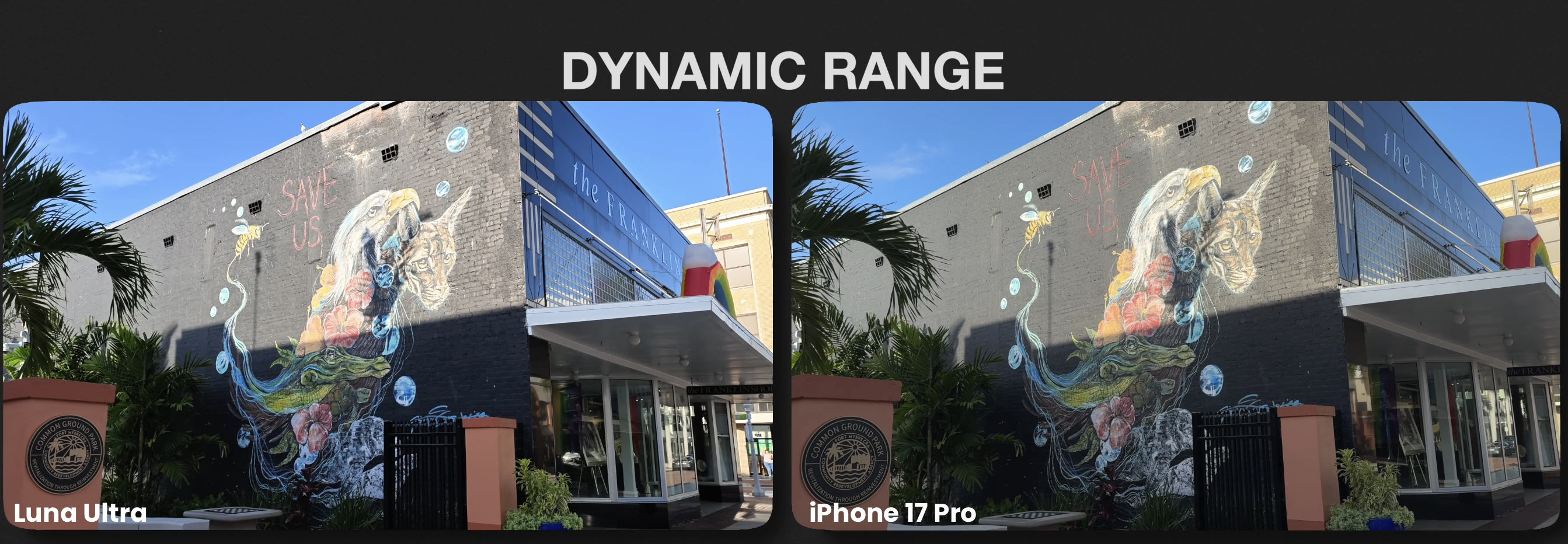
I also wanted to see what both cameras would do in a high dynamic range scene.
For this particular test, I shot both cameras in their standard profiles.
That's important because I'm not really testing the absolute maximum dynamic range of either sensor here.
I'm looking at how each camera's standard profile and tone curve handle the scene.
The Luna Ultra put more color into the sky and the side of the building.
It also used more contrast.
The downside was that some of the brighter brick highlights clipped a little sooner.
The iPhone had a gentler roll-off in both the highlights and shadows in that particular shot.
And for that specific test, I preferred the iPhone.
Shadow Retention
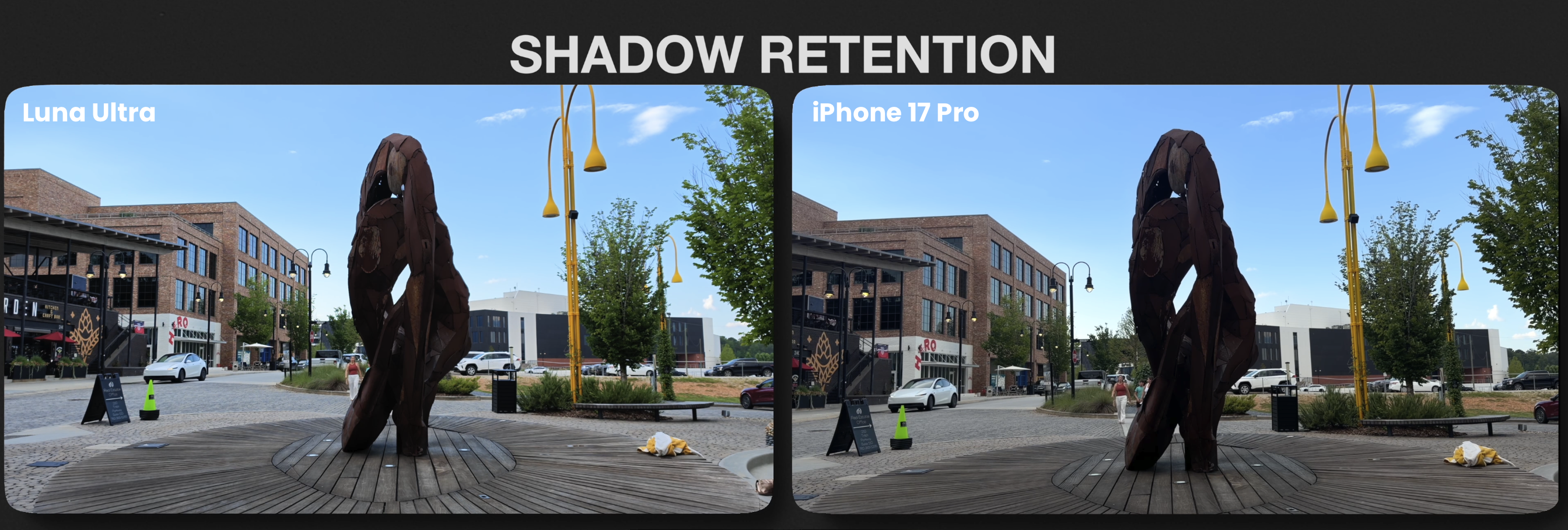
Shadow retention was interesting because the result flipped again.
When I looked inside a dark metal sculpture, the Luna Ultra held onto noticeably more detail in the deepest shadows.
I could still see some of the shape and texture inside areas that were extremely dark.
The iPhone crushed more of those areas down toward black.
So even though I preferred the iPhone's highlight roll-off in the previous test, the Luna held more usable information in certain deep-shadow situations.
Highlight Retention
Then I tested the opposite.
I wanted to see what would happen when there was a very bright sky in the frame.
This time the Luna Ultra did a really good job.
I could still see texture in the sky, and there was still some color remaining in those bright areas.
The iPhone blew much more of that sky out.
Once those highlights were gone, there wasn't much information left.
For the way I personally like an image to look, I preferred the Luna Ultra in that shot.
Blue Hour and Sunset Colors
Blue hour is where things got really interesting.
There were times when the Luna Ultra pushed blue more aggressively than the iPhone.
In one driving shot, the Luna made the sky considerably bluer than what I remember actually seeing while I was standing there.
The iPhone held a little more haze near the horizon, and in that particular shot, I preferred the iPhone.
If I were filming the Luna Ultra again in that same situation, I would probably switch over to i-Log and grade the image myself.
That's one reason I don't think these comparisons have a simple winner in every category.
Sometimes the Luna looks more natural.
Sometimes the iPhone does.
Interior Low Light
In certain interior low-light scenes, I was surprised by how close the two cameras looked.
When the lighting was relatively controlled, the color science landed in a very similar place.
There were shots where, if you removed the labels, I think most people would have a hard time telling which camera was which.
But once I moved outside into a more difficult low-light environment, the differences became more noticeable again.
The Luna Ultra generally produced more contrast and a darker, more realistic-looking image to me.
That's the version I would personally want to use in one of my videos.
Auto White Balance Under Artificial Light
One indoor scene had a lot of green light.
Neither camera tried to completely remove the green cast.
But the Luna Ultra preserved some warmth in the image.
You could still see small orange lights in the scene.
The iPhone pushed further toward teal and removed much more of that warmth.
For my taste, it went a little too far.
However, outdoors at roughly 5600K daylight, the iPhone's Auto White Balance behaved much better and locked into the scene more accurately.
Again, neither camera wins every single lighting condition.
Greens and Foliage
I always like shooting foliage and grass during camera comparisons because green can tell you a lot about color science.
On the grass itself, these two cameras were almost identical.
The bigger difference was in the tree line.
The Luna Ultra kept the trees slightly warmer and brighter.
The iPhone made them cooler and allowed more of the shadows underneath to stay dark.
And surprisingly, in that particular scene, I thought the iPhone 17 Pro looked more realistic.
Reds
I also wanted to see what both cameras would do with strong reds.
On the Luna Ultra, the reds looked slightly deeper.
But part of that was because the entire frame was also sitting darker.
The iPhone lifted the whole image, including the reds.
That additional brightness was one of those situations where the iPhone started looking a little more digital to me.
Again, it isn't necessarily inaccurate.
It's just a different style of image processing.
Zoom While Recording
I also tested digital zoom while recording.
For this test, neither camera was physically switching lenses.
Both were essentially scaling into the same image.
The Luna Ultra zoomed in more slowly than I wanted, although that's partly on me because I could have changed the zoom speed.
But I liked how the image held together throughout the move.
The iPhone got to the tighter framing faster.
However, the further I zoomed in, the softer the image became because eventually you're simply enlarging the pixels already there.
Real Estate Style Interior Shot
One of the most interesting shots in the entire comparison was a simple real estate-style interior.
With both cameras exposed the same way, I genuinely had trouble telling them apart.
The contrast was incredibly similar.
The colors were incredibly similar.
Neither one was dealing with extremely bright highlights or super-dark shadows.
And in that kind of evenly lit environment, the two cameras basically agreed with each other.
That says a lot about how good smartphone cameras have become.
So Which Is Better: Insta360 Luna Ultra or iPhone 17 Pro?
After shooting them side by side, I'm personally going with the Insta360 Luna Ultra.
But here's the interesting part.
A lot of that decision has nothing to do with image quality.
The Luna Ultra is a dedicated camera.
Nobody is calling me in the middle of a shot.
Nothing is buzzing in my hand while I'm trying to get my framing right.
I'm not seeing notifications while I'm filming.
When I pick up the Luna Ultra, I'm using it to create.
And that changes the way I work.
The iPhone 17 Pro is still the camera I reach for when I want to quickly capture a memory or grab a reference shot before coming back with other equipment.
And I want to be clear, the iPhone 17 Pro is genuinely a very capable camera.
But if I were planning to use an iPhone on a professional project, I probably wouldn't shoot it the same way I did for this comparison.
I'd switch over to Apple Log, control my exposure manually, and grade the footage myself.
And honestly, that's probably a comparison for another day.
Is the Insta360 Luna Ultra Worth Buying If You Already Have an iPhone?
I think this really depends on how you shoot.
If you mainly capture family clips, travel memories, quick videos, and occasional social media content, your iPhone 17 Pro is already incredibly capable.
You may not need another camera.
But if you're intentionally creating videos and want something that feels more like a dedicated filmmaking tool, the Luna Ultra starts making a lot more sense.
You're getting:
- A dedicated video camera
- Mechanical gimbal stabilization
- A 1-inch main sensor
- A dedicated 3X camera
- Manual exposure controls
- i-Log
- A detachable screen
- A device that isn't also your phone
And for me, that last point matters more than I expected.
Learn the Insta360 Luna Ultra With My Film 101 + Film 202 Course
If you decide the Luna Ultra is right for you, I created my Insta360 Luna Ultra Film 101 and Film 202 course bundle to take you from opening the camera for the first time all the way through actually filming cinematic footage with it.
In Film 101, I walk through the settings, exposure controls, frame rates, white balance, i-Log, stabilization, audio, and how I personally set up the Luna Ultra.
Then in Film 202, I get into the creative side of using the camera, including composition, movement, low-light shooting, slow motion, using the 1X and 3X cameras, and creating more cinematic footage.
I also have Film Look LUTs for the Luna Ultra and iPhone if you want to take the footage even further in post.
You can find the Insta360 Luna Ultra Film 101 + Film 202 Bundle and my LUT packs at The Film Alliance.
I'm Joe with The Film Alliance, and I'll see you in the next one.
Author